
Most CRM projects fail on an ordinary Tuesday, not on go-live day. The software works, but nobody agreed who updates what, when, and what the AI is allowed to touch. This is the daily rhythm we set up with sales teams on Bitrix24 and Odoo now that both platforms can transcribe calls, fill fields and score deals.
Key takeaways
- AI captures, people decide. Let AI transcribe, summarise and fill empty fields. Any change to a value a person entered stays a suggestion until someone accepts it.
- Six fixed moments a day are enough: pipeline triage, selling blocks, an inbound check, the quote handoff, a 15-minute data review and one coaching call.
- The 15-minute review is the habit that matters most. It keeps AI edits honest and keeps "deals with no next step" at zero.
- Measure the routine, not just revenue: first response time, deals without a next activity, stage age, field completeness and how many AI suggestions are accepted.
Why the daily routine matters more than the tool
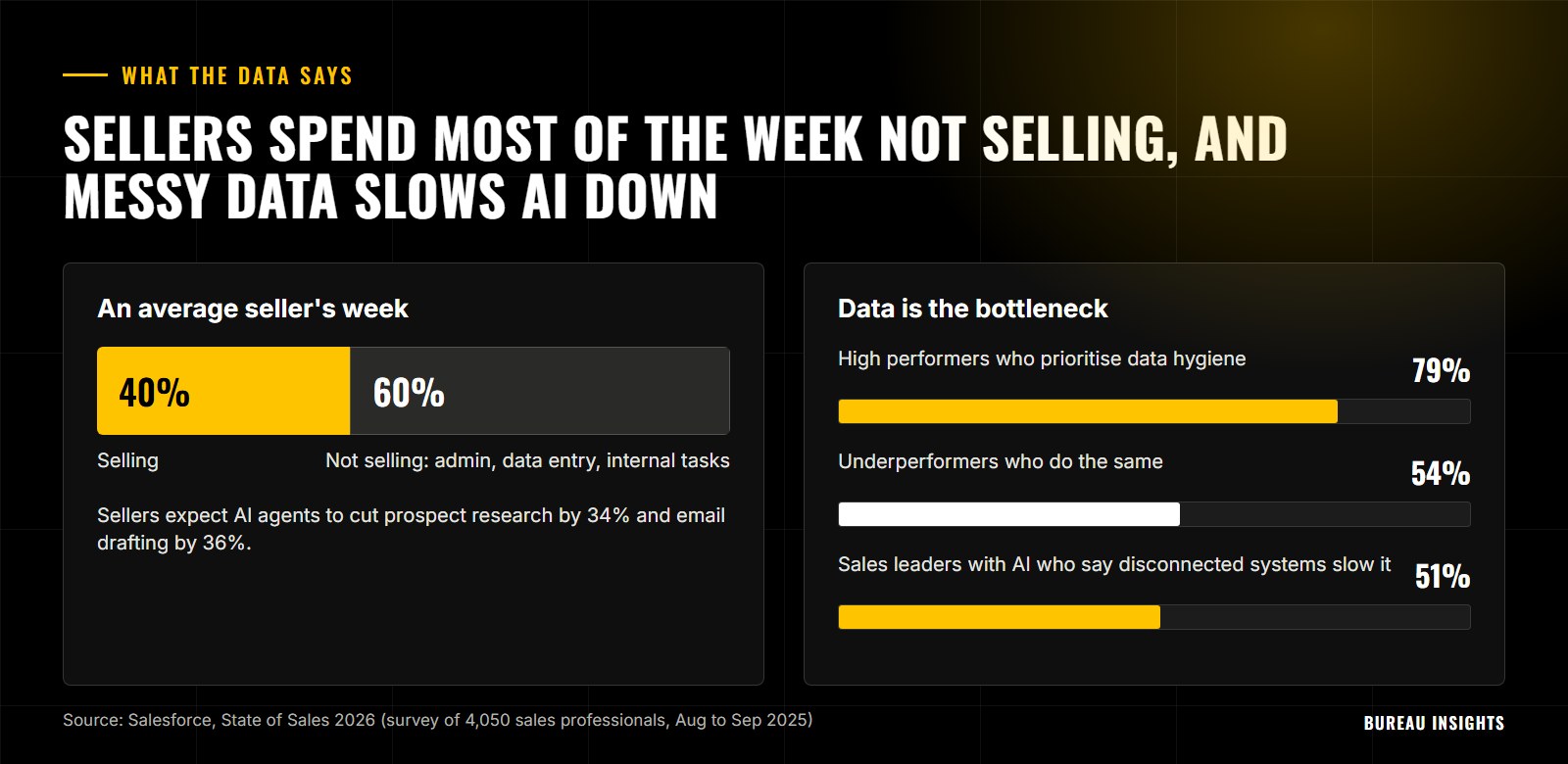
Salesforce's State of Sales 2026 survey of 4,050 sales professionals found that the average seller spends only 40% of the week selling. Sellers expect AI agents to cut prospect research by 34% and email drafting by 36%. The same survey shows where that promise breaks: 51% of sales leaders using AI say disconnected systems are slowing it down, and 79% of high performers prioritise data hygiene, against 54% of underperformers.
It is a familiar pattern in CRM projects. The AI features are switched on, but the CRM is still half-filled, so the summaries are thin and the scores are noise. What fixes it isn't another feature. It is a routine everyone follows, with clear lines between what the AI writes and what a person owns.
What AI can already do inside the CRM
Before designing the day, be precise about what the platforms do today. Overselling the AI is how teams end up trusting fields nobody checked.
Bitrix24 CoPilot in CRM processes a recorded call in three steps: it transcribes it, writes a summary and updates fields. According to the Bitrix24 help article on call transcription, it fills empty fields and, where a field already has a value, proposes a change instead of overwriting it. It works with string, list, number and integer fields, on calls between 10 seconds and one hour. It can also score a conversation and check it against your sales script. It is switched on per lead pipeline and per deal pipeline in the CoPilot settings, and it can also process chats and emails (setup guide).
Odoo CRM calculates a win probability for each opportunity with predictive lead scoring. The Odoo documentation describes a naive Bayes model trained on your own won and lost history. Stage and sales team are always used. You choose extra variables such as country, source, language, tags, and phone and email quality. A salesperson can override the probability by hand until they restore the computed value. Odoo also offers AI agents and AI-filled fields; the standard Ask AI agent can open views and reports but cannot change data (Odoo AI documentation).
Both platforms draw the same line: AI proposes, the record owner confirms. Build your day around that line.
The day, hour by hour
The times below suit a team that starts at 08:30. Shift them to your hours, but keep the order. Each block has an owner, a fixed length and a clear output.
| Time | Block | AI does | People do | Output |
|---|---|---|---|---|
| 08:30 | Pipeline triage (manager, 20 min) | Lists deals with no next activity, deals stuck past the stage limit and big probability changes since yesterday | Decide per deal: push, reassign or close as lost with a reason | Every open deal has an owner and a dated next step |
| 09:00 | Rep's plan (10 min) | Orders today's activities by probability and deal value | Pick the three deals that move the month, block time for them | A realistic call list |
| 10:00 | Selling blocks (2.5 h) | Records and transcribes calls, summarises, fills empty fields | Sell. No typing during the call; confirm the next step before hanging up | Calls logged with summaries without manual notes |
| 12:30 | Inbound check (15 min) | Drafts replies to new WhatsApp, chat and email enquiries; flags anything past the response target | Edit and send the drafts; call hot leads back | No enquiry waits past your response target |
| 14:00 | Quote and ERP handoff (as needed) | Pre-fills the quotation from the deal and product catalogue | Check price, stock and payment terms; send | Quote linked to the deal, order created in the ERP when won |
| 16:00 | Data review (15 min, every rep) | Queues its suggested changes, possible duplicates and stale deals | Accept, reject with a reason, or fix | Clean records, zero deals without a next step |
| 17:30 | Coaching (manager, 15 min) | Scores calls against the script, highlights missed steps | Listen to one call per rep per week and give one piece of feedback | A script that improves from real calls |
08:30: the manager's pipeline triage
The manager opens one saved view, not five reports. It shows three lists: open deals with no planned activity, deals older than the time limit for their stage, and deals whose probability moved more than ten points since yesterday. The manager makes a decision on each and moves on. Twenty minutes is plenty if the stage limits were agreed beforehand: for example, five working days in "Qualified" and ten in "Proposal".
A deal leaves the stuck list only when it has a dated next activity or a lost reason. "Follow up" with no date doesn't count.
10:00: selling blocks, with the AI as note-taker
This is where the hours come back. With call processing on, the rep stops typing notes during and after calls. The transcript, the summary and the newly filled fields arrive on the deal a few minutes later. The rep's one job before hanging up is to agree the next step with the customer, because that is the field the AI cannot invent.
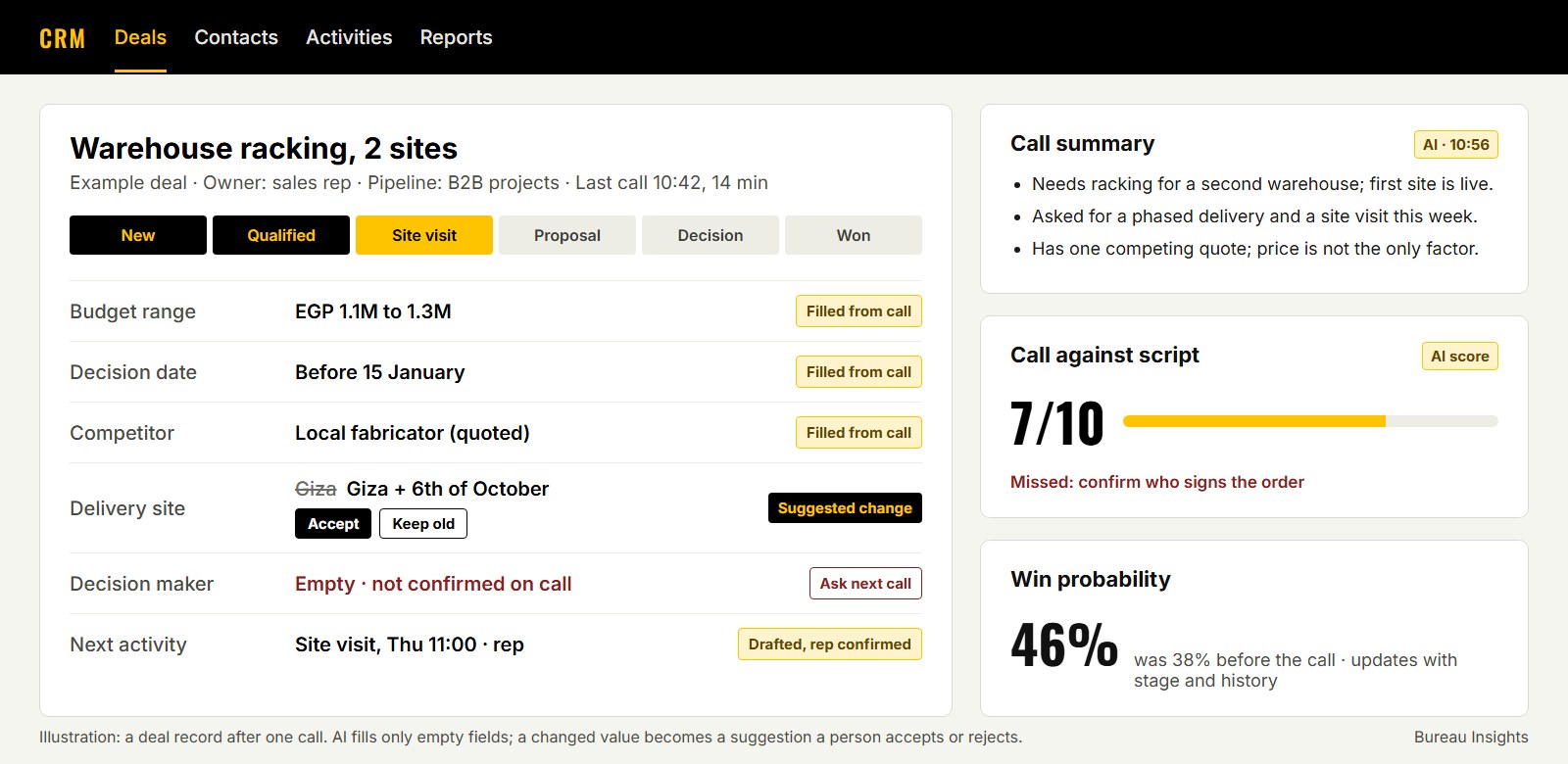
Look at the decision-maker field in the illustration. The AI left it empty because the customer never said who signs. That gap is useful: it tells the rep what to ask on the next call. A summary that invented a name would be worse than no summary.
12:30: the inbound check
Enquiries from WhatsApp, website forms and email land in open channels during the morning while reps are on calls. At 12:30 each rep goes through the AI-drafted first replies, edits the tone and facts, and sends. Anything older than your response target goes to the top. If you run a duty rota, the rep on duty does this every hour instead.
Keep a person on the send button for the first few weeks. Drafts will get prices, availability and tone wrong at the start. Every correction teaches you which answers can later be sent automatically, such as opening hours or document requests, and which never should be, such as prices or delivery dates.
14:00: the quote and the handoff to the ERP
The most expensive re-typing in a growing company happens between sales and operations. When the CRM and ERP are connected, whether Odoo on both sides or Bitrix24 linked to an ERP, the quote is built from the deal, and the won deal becomes a sales order without anyone copying lines. The rep checks three things before sending: price list, stock or capacity, and payment terms. We cover the connection in more depth on our integration page.
16:00: the 15-minute data review
This is the habit that decides whether the AI gets better or the CRM gets worse. Every rep opens their own queue of AI suggestions and works through it before the end of the day.
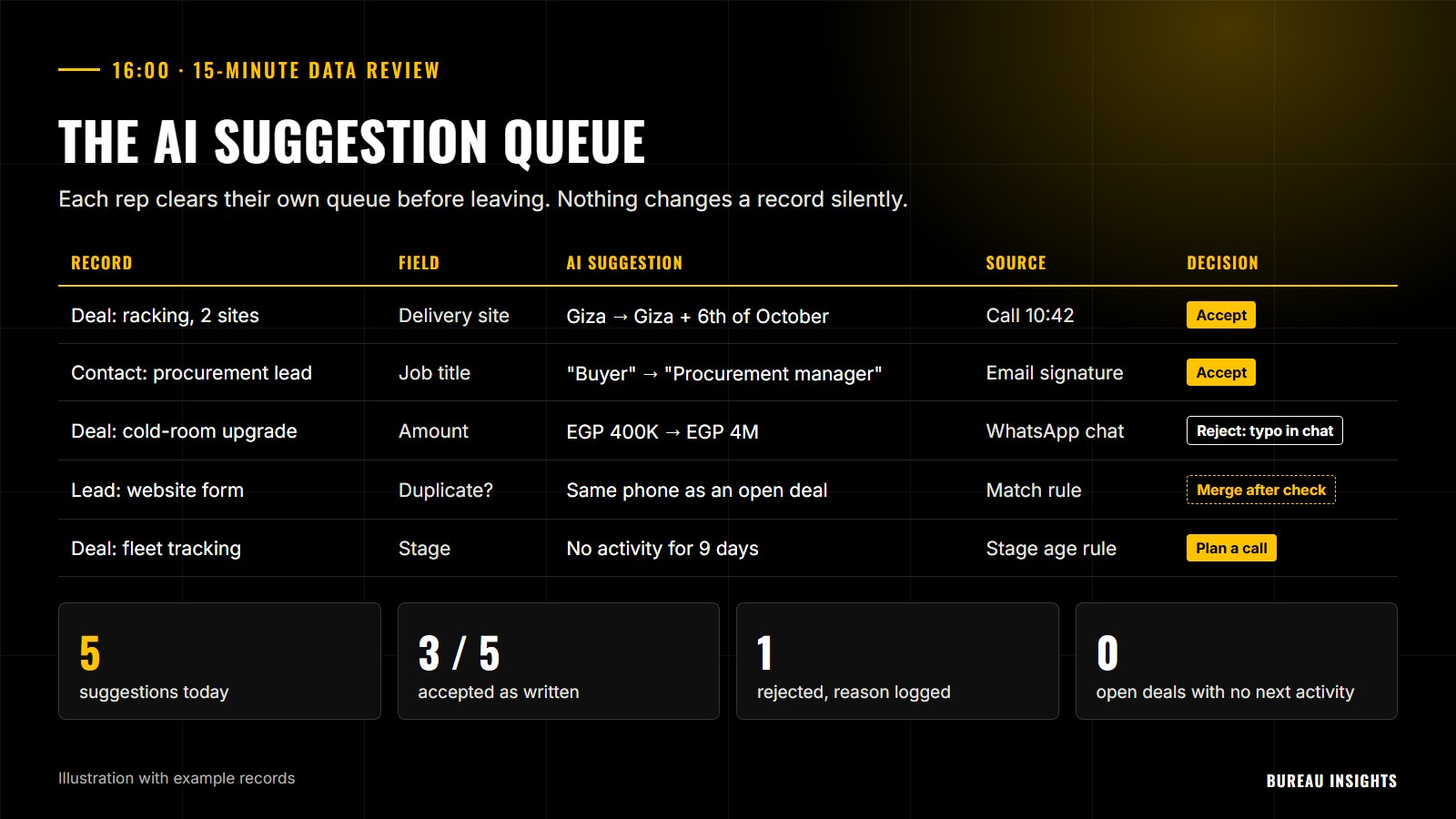
Three rules keep the queue short:
- Reject with a reason. "Typo in chat" or "customer was joking" tells you whether to adjust a field, a prompt or nothing.
- Never merge duplicates blind. A shared phone number can be a receptionist, not the same customer.
- Stale deals get a dated activity or a lost reason before the rep leaves.
When the acceptance rate for a field stays high for a month, for example job titles taken from email signatures, you can let that one field update without review. Fields that carry money or dates stay manual.
17:30: coaching on one call
Call scoring against the script is one of the most useful AI features and one of the least used. Managers don't need to listen to every call. They need the AI to point at the two calls a week where a step was missed, listen to one, and give the rep one specific piece of feedback. When the same step is missed across the team, change the script, not the people.
A worked example: one deal through one day
Take the deal in the illustration: a distributor asking for warehouse racking at two sites. The numbers and names are examples, but the flow is the one we configure.
- 08:30 The deal shows in the manager's triage because it has sat in "Qualified" for six days. The manager keeps it with the rep and asks for a call today.
- 10:42 The rep calls. The customer mentions a budget range, a decision before mid-January, a competing quote and a second site in 6th of October.
- 10:56 The summary is on the deal. Budget, decision date and competitor were empty, so they are filled. Delivery site already said "Giza", so the AI proposes "Giza + 6th of October" instead of overwriting it. Decision maker stays empty. The script check scores the call 7/10: the rep never asked who signs the order.
- 11:00 The rep books the site visit for Thursday and moves the deal to "Site visit". The win probability rises from 38% to 46% as the stage changes.
- 16:05 In the review, the rep accepts the delivery-site change.
- 17:30 The manager plays the two minutes where the decision maker should have come up and agrees with the rep on one question to ask at the visit.
Total typing by the rep: one activity and one click. The record is more complete than it would have been with manual notes, and every AI edit was seen by a person.
Set-up checklist
On Bitrix24
- Turn on CoPilot in CRM for each deal pipeline separately and pick the scenarios: calls, chats, emails.
- Load your real sales script so calls are scored against it, not against a generic one.
- Decide which fields CoPilot may fill. Keep them as string, list or number fields with clear names. "Budget range", not "Field 7".
- Add automation rules for stage time limits and for deals without a planned activity, so they show in the 08:30 view.
- Set response language per user if your team works in Arabic and English.
On Odoo
- In CRM settings, review the predictive lead scoring variables. Add source and country only if they are filled consistently; empty variables add noise.
- Create activity plans per stage so every stage change proposes the next activity.
- Use quotation templates so the 14:00 handoff takes minutes.
- Pilot AI fields on one low-risk field first, such as a summary or a category, and review them in the daily queue.
On both platforms: required fields per stage, one owner per record, and a written lost-reason list.
The numbers to watch every week
| Metric | What it tells you | A healthy direction |
|---|---|---|
| Open deals without a next activity | Whether the routine is followed | Zero at the end of each day |
| First response time to new enquiries | Whether the 12:30 check and duty rota work | Within your published target |
| Average days in stage | Where deals stall | Falling, or stable within the limits |
| Field completeness on key fields | Whether AI and reps are capturing what matters | Rising in the first month |
| AI suggestions accepted as written | Whether the AI can be trusted with more | Rising; investigate fields that stay low |
| Forecast against actual | Whether probabilities mean anything | Gap narrowing quarter by quarter |
Mistakes we keep seeing
- Letting AI overwrite values. One wrong amount in a forecast costs more trust than a hundred correct summaries earn.
- Switching everything on at once. Start with call summaries and the review queue. Add drafted replies when the queue is under control.
- Scoring on dirty history. Predictive scoring learns from your past won and lost deals. If lost deals were never closed as lost, the model learns nothing useful. Clean the history first.
- No time in the calendar. The 16:00 review fails if it's "when you have time". Put it in everyone's calendar.
If you want the bigger picture first, read why the process comes before the platform and why people stay in the loop.
Frequently asked questions
Can Bitrix24 CoPilot overwrite CRM fields?
Not silently. According to Bitrix24's help centre, CoPilot fills empty fields from a call, chat or email. If a field already has a value, it suggests a change and the user decides whether to keep or replace it.
How does Odoo calculate the probability of a deal?
Odoo uses predictive lead scoring, a naive Bayes model trained on your own won and lost opportunities. Stage and sales team are always included, and an administrator can add variables such as country, source, language, tags and email or phone quality.
How much time can AI save a sales team?
It depends on how much of the week goes to notes and admin today. In Salesforce's State of Sales 2026, sellers reported spending 40% of their time selling and expected AI agents to cut research time by 34% and email drafting by 36%.
Do we need clean data before turning AI on?
You need clean history for scoring and forecasting. For call summaries and field filling you can start straight away, as long as the daily review is in place so errors are caught early.
Should AI send replies to customers on its own?
Not at the start. Keep a person approving drafts for the first weeks, then automate only the answer types that were accepted without edits, such as opening hours or document requests. Prices and delivery dates should stay with a person.
Sources
- Salesforce, The Productivity Gap: State of Sales 2026, 3 February 2026.
- Bitrix24 Helpdesk, CoPilot in CRM: Call transcription and automatic field updates.
- Bitrix24 Helpdesk, CoPilot in CRM: Set up call, chat, and email processing.
- Odoo 19 documentation, Assign leads with predictive lead scoring.
- Odoo 19 documentation, AI.
Want this rhythm in your CRM? We set up the pipelines, AI settings, review queues and dashboards on Bitrix24 and Odoo, then stay to run and improve them. Book a free consultation or see how we operate systems after go-live.